
Automate the boring part. Then design for the weird part.
There’s a 5-page paper from 1983 going around again. It’s called “Ironies of Automation”, by Lisanne Bainbridge.
It was written about factories and control rooms. Not AI. Not n8n. Not invoices.
But read it today and it feels like it was written last week.
The idea is simple. When you automate the routine work, the human doesn’t disappear. The human gets whatever the machine can’t handle. And that’s usually the weird, hard, messy stuff. On top of that, they get less practice, because the easy cases that used to keep them sharp are now gone.
So the irony is this: the better your automation gets, the more the rare moments where a human steps in matter.
Everyone is talking about this for AI coding right now. I want to talk about it for normal business work. Invoices, approvals, data entry. The stuff I actually build for clients.
The happy path is a one-day demo
Here’s a secret about AI automations: the demo is the easy part.
Invoice comes in. AI reads it. Bill gets created in QuickBooks. Everyone claps.
You can build that in a day. And it’ll work great, on the invoices you picked for the demo.
Then real life shows up:
- An invoice that doesn’t match what was ordered.
- A vendor that changed their PDF layout.
- A PDF that’s basically a photo of a piece of paper.
- The same invoice sent twice, and the second time the vendor name has a typo.
- A new vendor nobody has ever seen.
- A bill that’s way bigger than usual.
None of these are rare in a real business. They’re just not in the demo.
And this is exactly where the 1983 paper bites. If your automation handles the easy cases and then dumps the weird ones on a human with no context, you made the human’s job harder, not easier.
Where this came from for me
A distribution company asked me to help them automate some of their manual work. After a couple of reviews of how they handled it by hand, billing stood out as the first thing worth automating. Specifically accounts payable: invoices coming in by email and someone typing them into QuickBooks, line by line.
So I built an n8n agent for it. And honestly, most of my time didn’t go into the “AI reads the invoice” part. It went into one question:
When the agent isn’t sure, what does the human see, and is it enough to decide fast?
Quick note: the client’s data is private, so every screenshot below is from my own test runs with test vendors. Same workflow, data I’m allowed to show.
Rule 1: the AI doesn’t get the last word
The AI’s job is to read. It pulls the vendor, invoice number, dates, line items and totals out of the PDF.
That’s it. It doesn’t decide anything.
After that, plain boring code checks the work:
- Does the math add up?
- Are the required fields there?
- Do we know this vendor?
- Is this already in QuickBooks?
Why code and not more AI? Because code is boring in the best way. It gives the same answer every time, and when it says no, you can see exactly why.
Rule 2: write down when the machine is allowed to act alone
This is the part most people skip. They let the AI “decide when it’s confident”. Which sounds nice, until you remember AI can be very confident and very wrong.
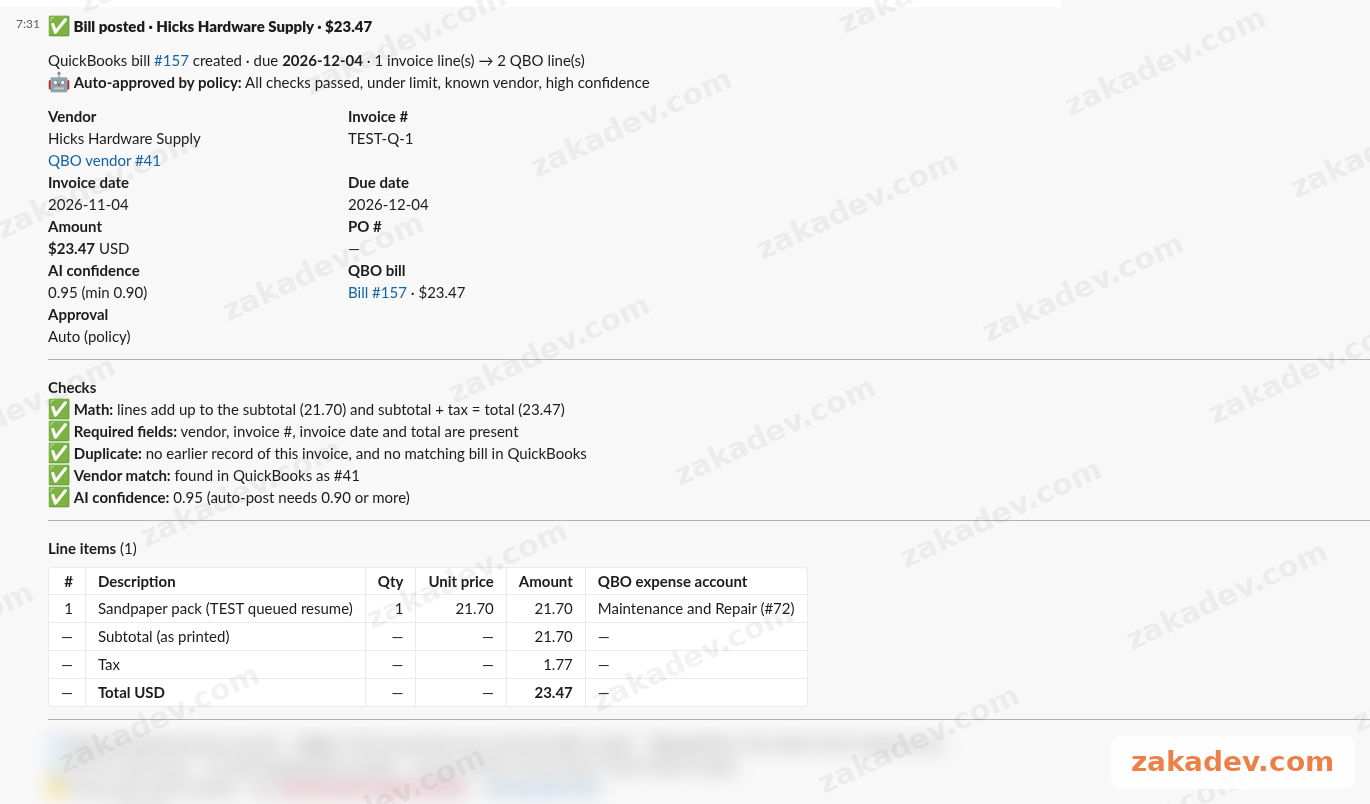
So I write the rules down. In the invoice agent, a bill gets posted automatically only when all of these are true:
- It’s under $500.
- The vendor is already known.
- The AI is at least 0.9 sure about what it read.
- It’s not a duplicate.
Then it posts the bill to QuickBooks with the original PDF attached.
Anything bigger, newer, or weirder? A human looks at it first. No exceptions, no matter how clean it looks.
The exact numbers are different for every company. $500 might be $50 or $5,000 for you. The point isn’t the number. The point is that the line is written down, and everybody knows where it is.
Rule 3: the handoff is the product
Here’s where the 1983 paper really matters.
When something needs a human, “please review invoice” is useless. The person has to open the email, find the PDF, open QuickBooks, look up the vendor, and figure out what’s wrong. That’s the old job again, just with extra steps.
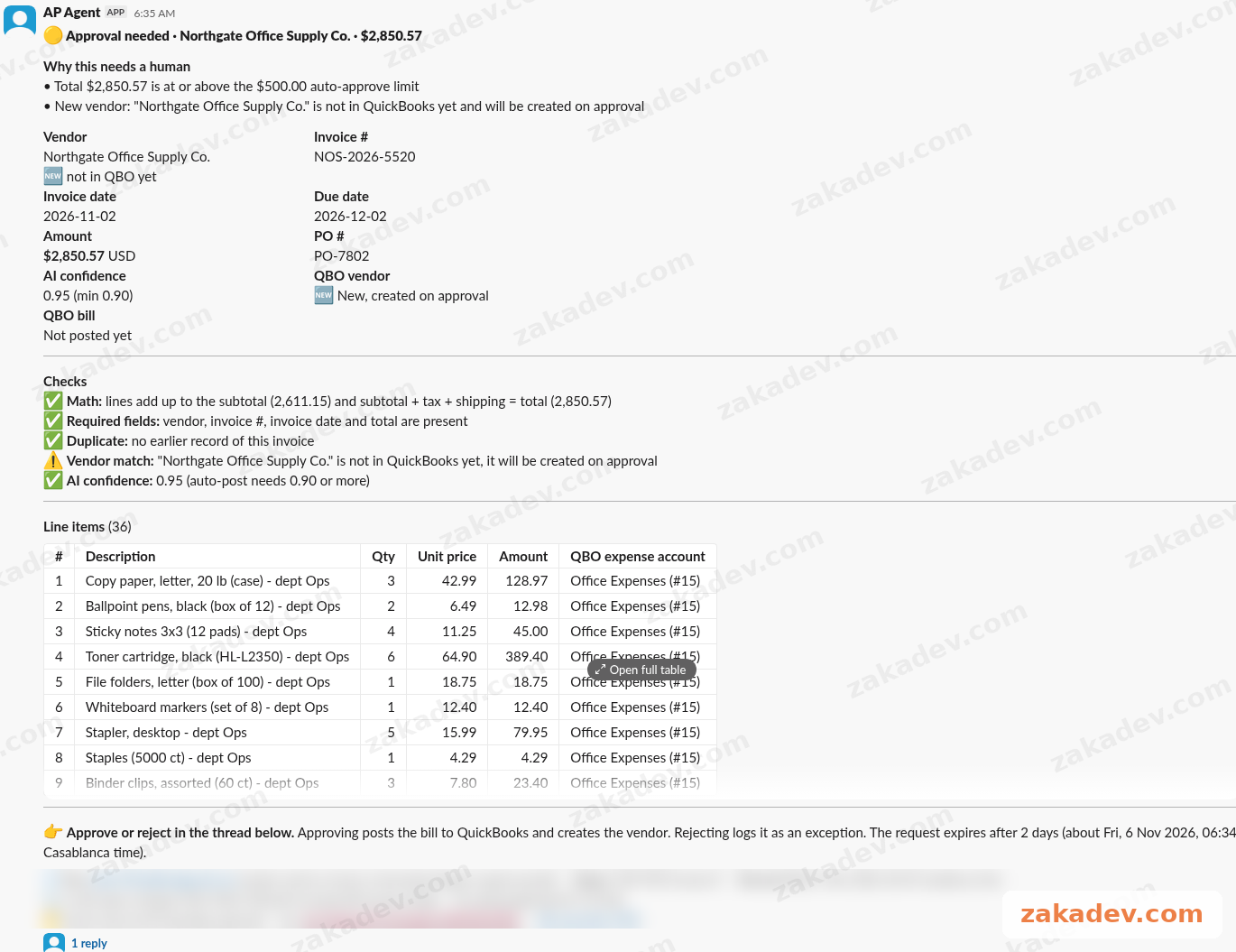
So in the invoice agent, the doubtful ones land in a Slack channel (#ap-approvals) with:
- The reason it got stopped. Too big, new vendor, low confidence, whatever it was.
- A short summary of what the AI read.
- The original invoice, right there.
The person reads it, approves or rejects in the thread, and the agent carries on from there. No tab hunting.
That’s the whole trick. The human doesn’t just get the decision. They get the context to make the decision fast.
Rule 4: catch the weird stuff before it becomes a human problem
Some weird cases shouldn’t even reach a human. They should just be stopped.
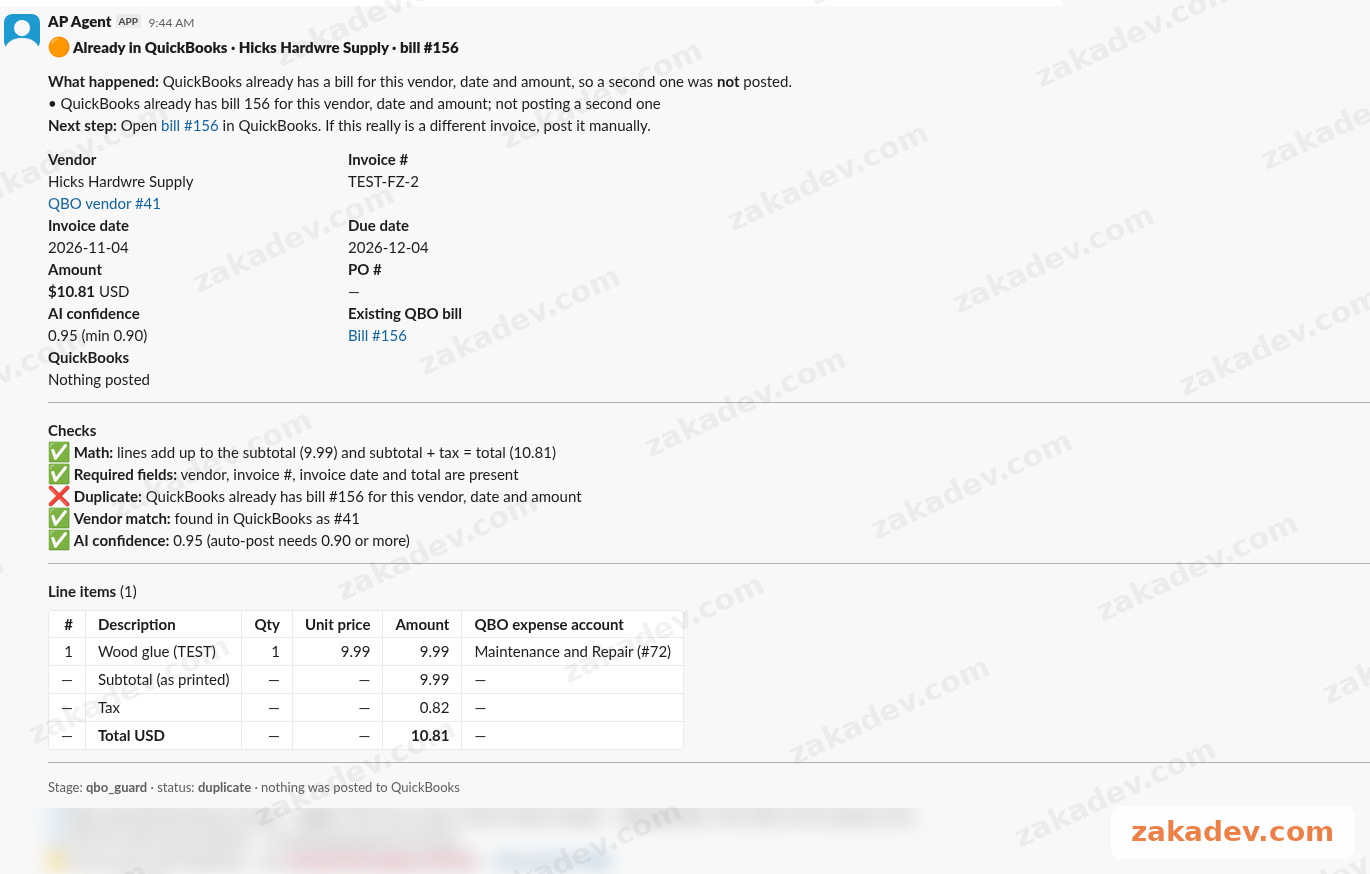
My favorite test: I sent an invoice from “Hicks Hardwre Supply”. Yes, with the typo. QuickBooks already had that same bill from “Hicks Hardware Supply”.
A simple name match would miss it. The agent caught the duplicate anyway and posted nothing.
That’s the kind of mistake a tired human makes at 5pm on a Friday. And the kind a careless automation makes all day long.
Rule 5: assume things will break, and say so
Real systems fail. APIs time out. QuickBooks has a bad minute.
So when posting to QuickBooks fails, the agent retries every 15 minutes, up to 3 tries. It doesn’t silently give up, and it doesn’t create the same bill three times.
And small boring defaults are written down too. If an invoice has no due date, it uses Net 30. Not a guess, a rule everybody agreed on.
Rule 6: keep the human in practice
This is the second irony from the paper, and the one people forget. If the human only sees the weird cases, they slowly lose the feel for what “normal” looks like.
Two small things help:
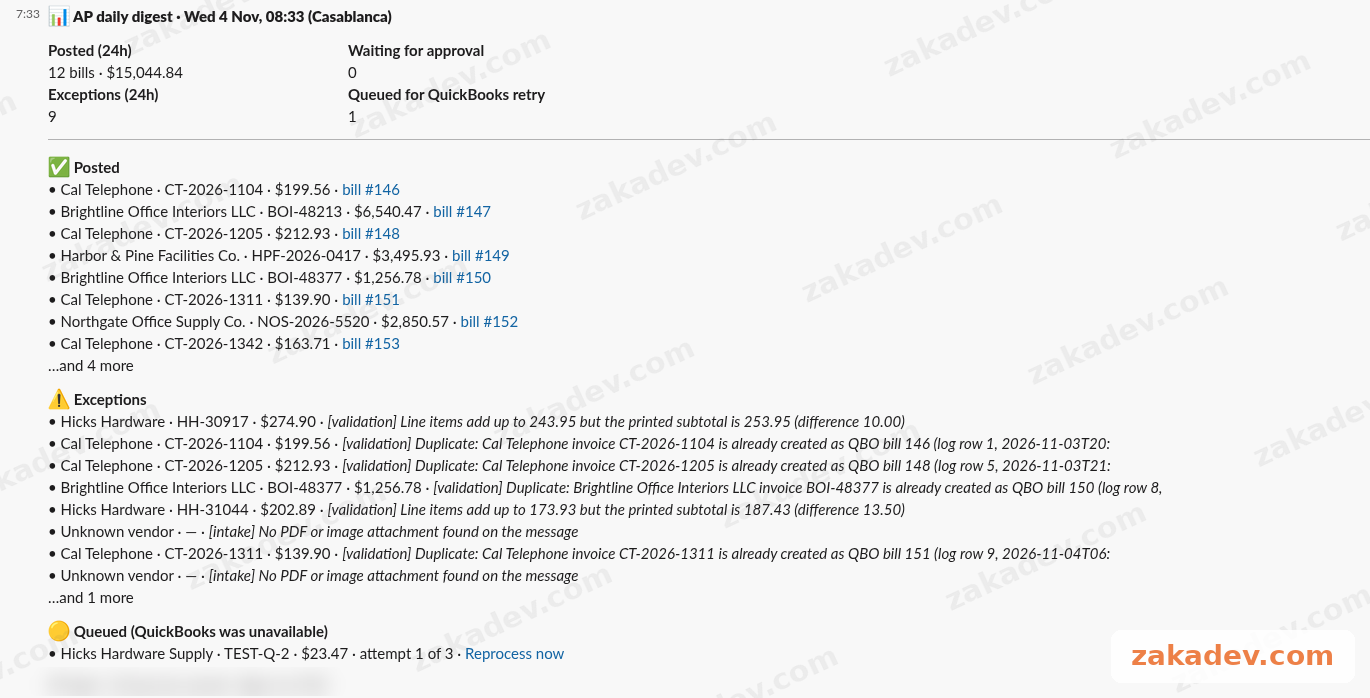
- A daily digest. Every morning at 08:00, a short summary lands in Slack: what got posted, what’s waiting, what got stopped. So the team still sees the whole picture, not just the fires.
- An audit log. Every decision gets written down, by the agent or by a person. So “why did this get posted?” always has an answer.
A quick checklist before you automate anything
If you’re thinking about an AI workflow for your business, ask these before anyone builds anything:
- What exactly is the AI allowed to do alone? Write it as rules, not vibes.
- What checks run after the AI, in plain code?
- When it stops, what does the human see? The reason, the original, and a summary. In the tool they already use.
- How does the human answer? One click or one reply, not five tabs.
- What happens when something fails? Retries, limits, and no double posting.
- How does the team stay in the loop on normal days? A digest, a log, something.
If you can’t answer number 3, your automation isn’t done. It only works on the demo.
The boring conclusion
The 1983 paper isn’t saying “don’t automate”. It’s saying the human part doesn’t go away. It moves. And if you don’t design it, it moves to the worst possible place.
So yes, automate the routine. Let the AI do the boring part.
Then spend most of your time on the weird part. That’s where the real product is.
Want this for your business?
The invoice agent started as one client’s build. Now it’s a package I fit to each company, because every company has a different accounting tool, different approval limits, different people signing off, and vendors named five different ways.
It’s part of my fixed-price n8n and Make automation package. You can see what’s included and book a call on zakadev.com.